
Yes, plywood takes print well: UV flatbed printing gives full-colour images straight on a sanded face, screen printing suits long runs of one or two colours, sublimation works only on polymer-coated wood, and a laser marks rather than prints. The face, its flatness and the primer decide the plywood print more than the printer does. Minh Thanh Plywood makes the sanded, UV-ready panels print shops start from.
Plywood prints as wall art: sizes, thicknesses and what buyers compare
Many people asking for a “plywood print” want a photo or artwork printed on a birch plywood board to hang on a wall, as sold by Finnish and Nordic print shops. Those prints share a pattern.
Sizes run from small 14 × 20 and 20 × 30 cm to 30 × 40, 50 × 70, 70 × 100 and 100 × 140 cm. Three thicknesses are sold: an ultra-thin print of about 1 mm that is hung flat, an original print of about 15 mm, and a premium print of about 30 mm with a deep edge. The pale birch face shows through the ink, so every print is unique, and the grain is the selling point.
What buyers compare:
| Choice | Typical range | What it changes |
|---|---|---|
| Size | 14 × 20 cm to 100 × 140 cm | Wall space and price |
| Thickness | 1 mm, 15 mm, 30 mm | Flat hang or a block with a shadow edge |
| Face | Sanded birch, light and even | How true the colours stay |
| Wood origin | PEFC- or FSC-certified forests are common claims | Sustainability |
| Hanging | Hook or tape on thin boards, cleat or frame on thick ones | Wall fit |
Wood stores carbon for the life of the product, which print brands mention in their sustainability copy; the claim stays general here.
For print brands: Minh Thanh Plywood supplies the blank, not the finished print. Sanded birch- and poplar-faced panels are cut to these print sizes, with thickness held to ±0.2–0.3 mm, a calibrated and flat face, and 8–12 % moisture (see the flatbed section below). Origin records and an EUDR dossier come with each order, so a brand can state where the wood comes from.
Can you print directly on plywood?
Yes. Plywood is one of the easiest wood panels to print on, because its face is a single sheet of real veneer, sanded flat. Four methods are used in practice: UV flatbed printing, screen printing, dye sublimation on coated wood, and laser marking, which burns an image rather than printing one.
What decides the result is the panel, not only the machine. A good plywood print needs a pale, even face, a thickness that does not wander across the sheet, a sheet that lies flat on the bed, and a surface that holds ink without soaking it up. Each of those is set at the plywood mill, long before the panel reaches a print shop.
Typical printed plywood products are signs and wayfinding, shop displays and point-of-sale stands, wall art and photo panels, toys and puzzles, packaging and gift boxes, and printed furniture fronts.
Printing on plywood: which methods work?
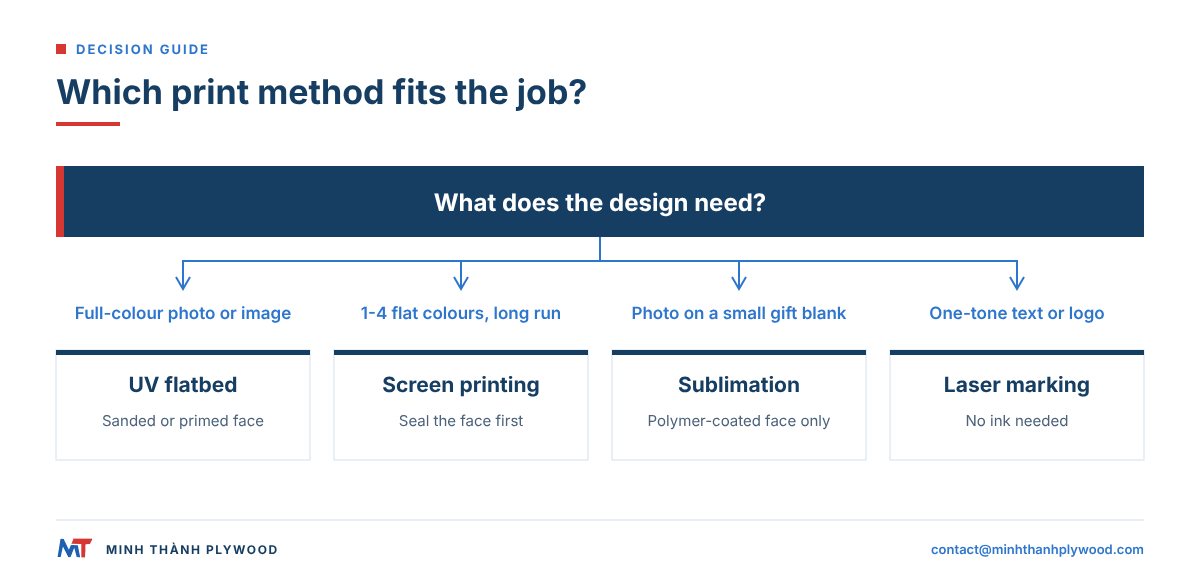
UV flatbed printing is the default for full-colour work on plywood; screen printing wins on long runs of simple graphics; sublimation needs a coated face; laser marking gives one-tone engraving.
| Method | How the image is made | Colour | Prep the face needs | Best for | Run size |
|---|---|---|---|---|---|
| UV flatbed inkjet | Ink jetted onto the panel and cured instantly by UV lamps | Full colour, plus white and clear | Sanded face; primer optional | Signs, displays, wall art, photo panels | One-off to medium runs |
| Screen printing | Ink pushed through a mesh stencil, one screen per colour | 1-4 spot colours | Sanded, often sealed | Logos and text on packaging, crates, toys | Long runs of one design |
| Dye sublimation | Heat turns ink to gas that bonds into a polyester coating | Full colour, photo quality | Polymer-coated face only | Photo panels, gifts, small blanks | Small runs |
| Laser marking | Laser burns or ablates the surface | One tone, brown to black | Clean, even face | Engraved text, logos, puzzles | Any run |
| Transfer or film | Printed film or paper laminated to the face | Full colour | Flat, smooth face | Furniture decor, large repeat runs | Large runs |
For mixed jobs, shops combine methods: a UV print for the image, then a laser or CNC router cuts the outline. Our guides to laser cutting plywood and CNC cutting plywood cover that second step.
Which plywood face prints best?
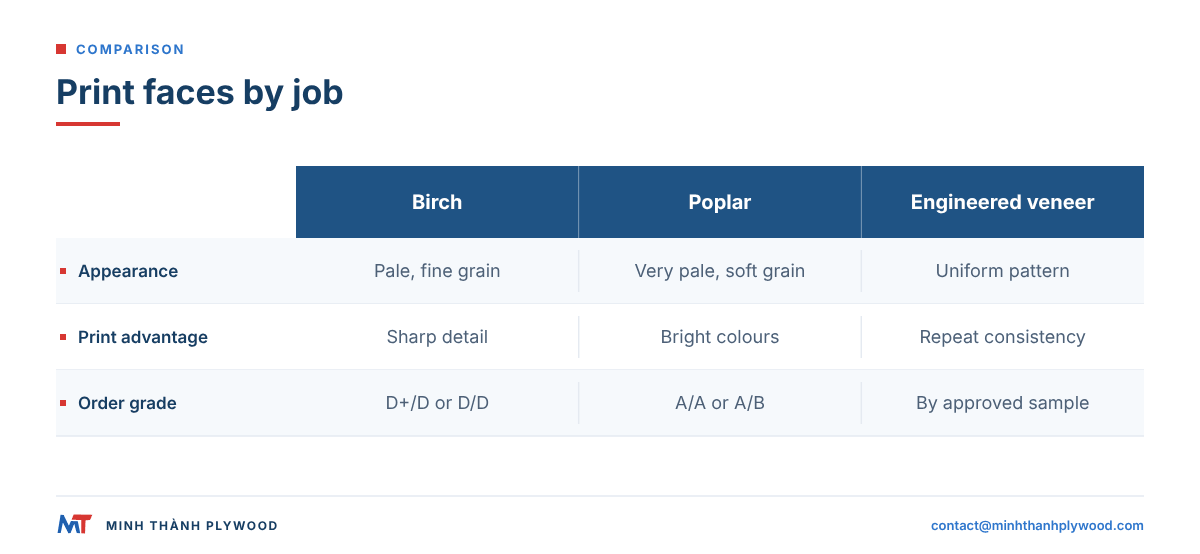
Birch and poplar faces give the best plywood print for most jobs: they are pale, close-grained and sand to a smooth, even surface. Engineered veneer is the choice when every panel in a run must look the same.
| Face | Colour and grain | How it prints | Grade to order |
|---|---|---|---|
| Birch | Pale cream, fine and quiet grain | Sharp detail, true colours; the reference face for print | D+/D for one show face, D/D for two |
| Poplar | Very pale, soft grain | Bright colours, light weight for displays | A/A or A/B, matched to the approved sample |
| EV (engineered veneer) | Uniform colour and pattern, sheet to sheet | Most consistent across a large run | Pattern and colour chosen from samples |
| Pine | Yellow with strong grain and knots | Rustic prints where the grain should show | A/B or B/B, by sample |
| Okoume | Pink-brown, even | Warm tone under transparent inks | A/B, by sample |
Birch faces at Minh Thanh are graded on the Vietnamese ladder E, D and D+ (low to high) and quoted as face/back pairs such as D+/D. Individually, D+ compares with the European B grade and D with BB, so D+/D sits close to B/BB. For printing, the grade matters because patches, knots and colour streaks under a light image show through the ink.
If the design is printed white-first or fully covers the face, a lower grade such as D/E or a B/B poplar does the job at a lower price.
How does UV flatbed printing on plywood work?
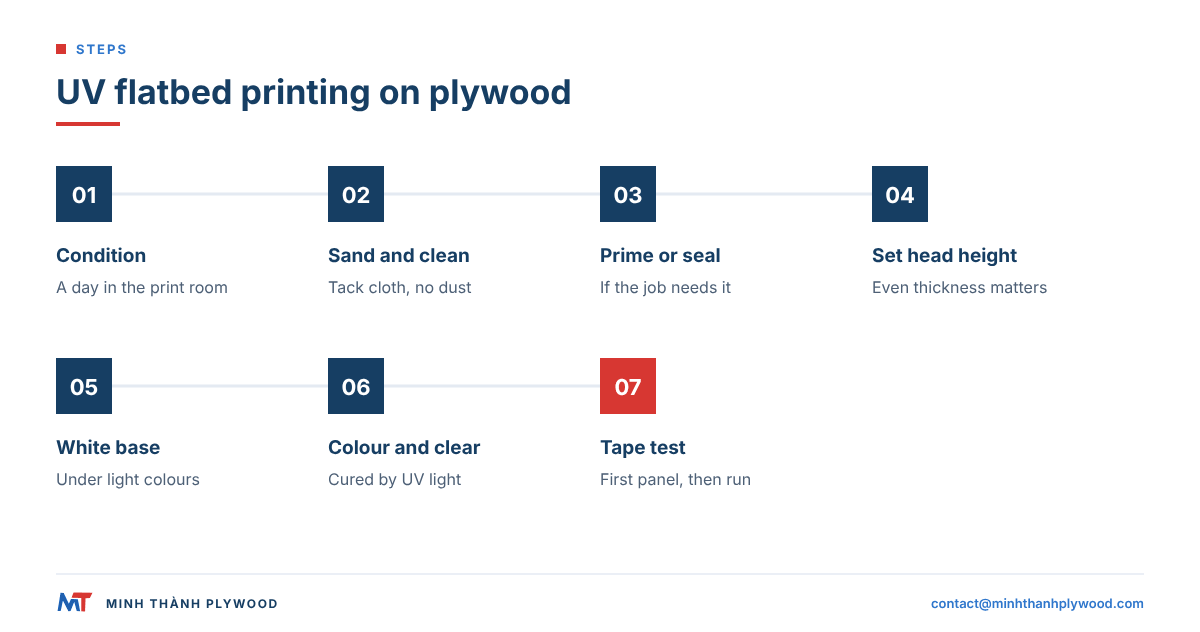
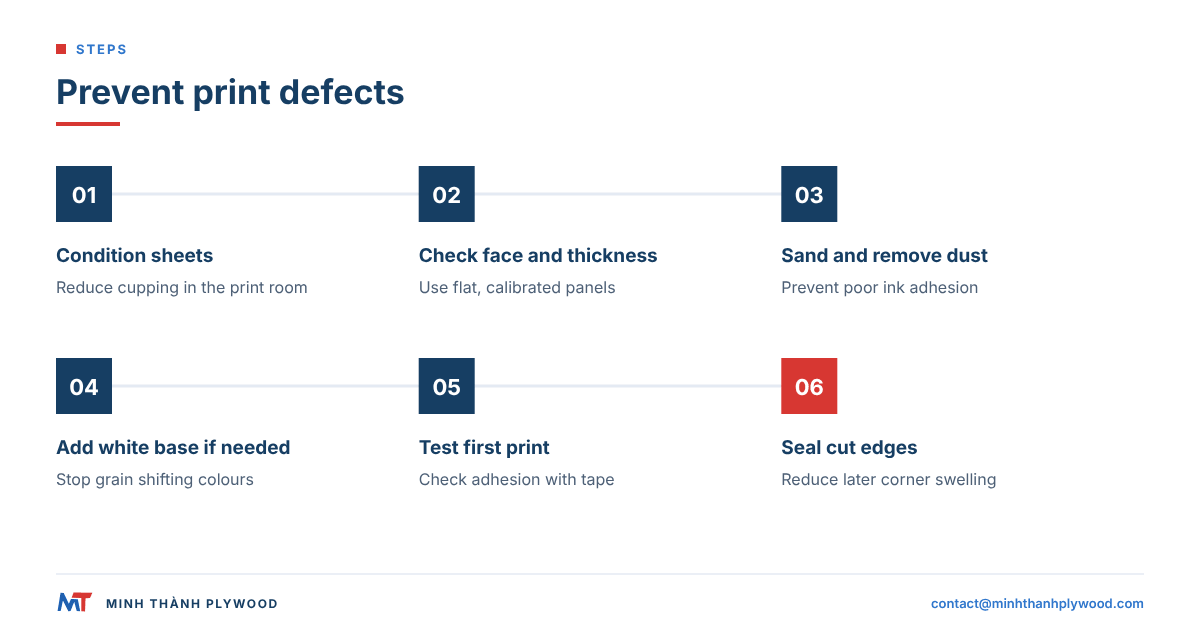
A UV flatbed printer holds the panel flat on a vacuum bed, moves its heads a few millimetres above the face and cures each pass of ink with UV light, so the print is dry the moment it leaves the machine. The steps:
- Condition the panels. Leave them in the print room for a day so the sheets settle to the room’s humidity and lie flat.
- Sand and clean. Light sanding removes handling marks; a tack cloth removes dust that would leave pinholes.
- Prime or seal, if the job needs it. A clear sealer evens out absorption; a white primer hides the grain.
- Set the head height. The printer measures the panel thickness; a sheet that is thicker at one corner risks a head strike or blurred dots.
- Print a white base where needed. White under light colours stops the wood tone shifting them.
- Print the colour layers, then a clear varnish layer if the job asks for gloss or extra scratch resistance.
- Test adhesion on the first panel with a cross-cut tape test before running the batch.
UV ink sits on the surface, so the texture of the face shows through. A polished face gives a smooth, even image; an open, coarse face gives a duller, grainier one.
Is screen printing on plywood worth it?
Screen printing is worth it when the design has one to four flat colours and the run is long, for example a logo on hundreds of crate panels, toy parts or packaging boxes. Once the screens are made, each print takes seconds and costs very little.
Screen inks are thicker than UV inkjet inks, so they cover the grain better and stand up to handling. The face must be flat and smooth: a raised grain or a sanding mark lifts the screen and leaves a gap in the print. Water-based inks soak into bare wood, so most shops seal the face first or use solvent or plastisol inks made for wood.
Screen printing struggles with photos and fine gradients. For those, UV flatbed printing is the better choice.
Can you sublimate onto wood?
You can sublimate onto wood only when the surface is coated with polyester. Sublimation ink turns to gas under heat and bonds into polymer; bare wood fibres do not hold it, so the image comes out pale and blurred.
Sublimation blanks are therefore made in two ways. Either a polymer coating is sprayed or rolled onto the plywood face and cured, or a thin coated sheet (aluminium or hardboard with a white polymer face) is laminated to a plywood backer. The coated blank then goes into a heat press, typically at around 200 °C for about a minute, depending on the coating maker’s settings.
For sublimation blanks, ask for a thin panel with a smooth, pale face and a stable core, because the heat press loads the whole sheet at once. Minh Thanh’s thin panels from 3 to 5 mm are always built as 5-ply, which keeps them flatter under heat than a 3-ply sheet of the same thickness.
Is laser printing on wood the same as printing?
No. A laser does not lay down ink; it burns or vaporises a thin layer of the face, leaving a brown-to-black mark in one tone. “Laser wood printing” usually means laser engraving or laser marking.
Laser marking is ideal for text, logos, serial numbers and puzzle outlines, and it needs no ink or drying. The result depends on the face: birch and poplar give a crisp, dark contrast, while a resinous or uneven face burns patchy. Glue lines matter too when the laser also cuts through the sheet. For workplace laser hazards, see the US Occupational Safety and Health Administration’s laser hazards page.
The full picture of power, speed and sheet choice is in our guides to laser cutting plywood and the best plywood for laser cutting.
Do you need to prime or seal plywood before printing?
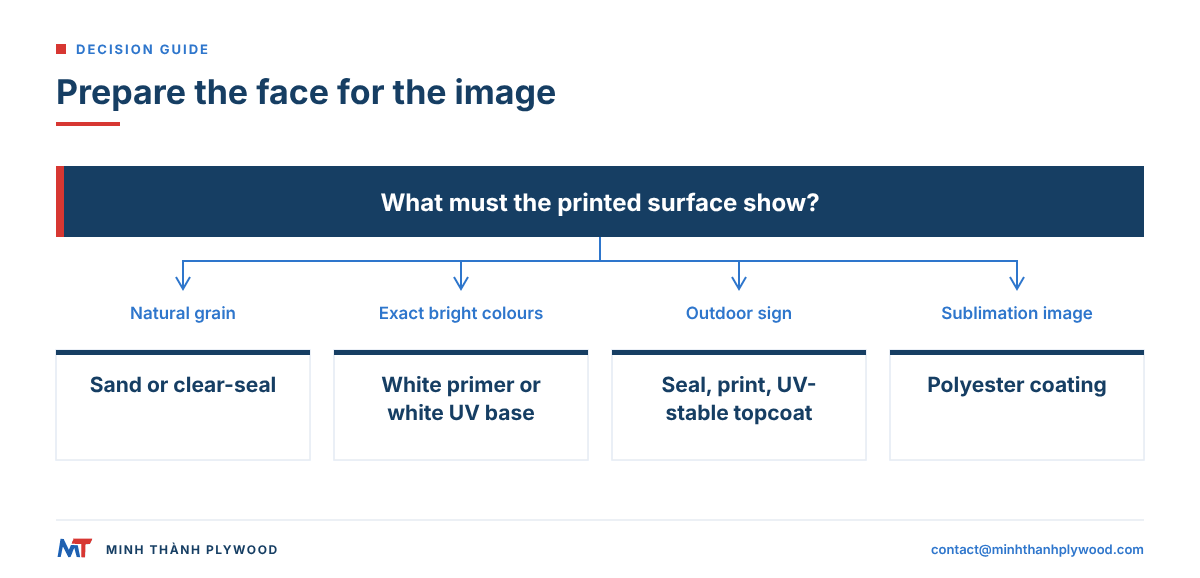
Prime or seal when the colour must be even across the face or the ink must hide the grain; skip it when the natural wood is part of the design. The choice by job:
| Goal | Prep | Why |
|---|---|---|
| Wood grain visible through the image | Light sanding only, or a clear sealer | Keeps the natural tone; sealer stops patchy absorption |
| Bright, exact brand colours | White primer or a white UV base layer | Removes the wood tone from under the colours |
| Long-life outdoor sign | Sealer, print, then a clear UV-stable topcoat | Protects the ink from water and sunlight |
| Sublimation | Polyester coating | The only surface sublimation ink bonds to |
Whatever the prep, seal the cut edges as well. Edges take up moisture faster than faces, and a panel that swells at the edges after printing can lift the ink at the corners.
Both faces of Minh Thanh’s furniture panels leave the factory UV-ready: sanded and polished to the standard customers need to apply their own UV coating. That same face takes a UV print or a primer without extra preparation in the print shop.
How flat and how thick must plywood be for a flatbed printer?
The flatter and more even the sheet, the closer the print heads can run and the sharper the image. Two things matter: thickness tolerance across the sheet and the sheet staying flat on the bed.
- Thickness tolerance. Our sanded furniture panels are held to ±0.2-0.3 mm, down to ±0.2 mm, so the head height set at one corner is still right at the opposite one.
- Flatness. Furniture-grade panels are pressed twice as standard: the core board is pressed and calibrated first, then the face and back are pressed on. A calibrated core gives a face without the dips and bumps that show as light and dark bands in a print.
- Moisture. Veneers and finished panels are dried to 8-12 % moisture content at dispatch, the normal range for furniture plywood, so sheets do not cup when they reach a dry print room.
- Core quality. Core layers stitched both horizontally and vertically keep the plies closed, so there are no hidden gaps under the face that dent when a vacuum bed pulls the sheet down.
A packing-grade panel with ±0.5-1.0 mm tolerance is fine for a screen-printed crate side, but it is the wrong blank for a photo print.
Can printed plywood be used outdoors?
Yes, if the panel, the ink and the finish are all built for it. An outdoor printed sign needs three things:
- An exterior bond. Choose a panel glued with water-resistant melamine-fortified or phenolic (WBP) glue. Interior panels glued with UF glue are for indoor prints.
- UV-stable inks and a clear topcoat. Sunlight fades most inks within a few seasons unless a UV-resistant clear coat protects them.
- Sealed edges and faces. Water enters through cut edges, screw holes and the back face; seal all six sides before installation.
For long-life outdoor signs, many sign makers use MDO (medium density overlay) plywood, which has a resin-impregnated paper face built for paint. Our guide to laser cutting plywood covers cutting printed sign shapes to outline.
Printed plywood or patterned veneer: which should you choose?
Choose a print when the design is an image, a brand graphic or a colour; choose a patterned veneer when the goal is a consistent wood look.
Printed wood grain on a cheap face looks flat up close, because the print has no depth. For furniture fronts and wall panels that must look like oak, walnut or a figured wood across a whole project, engineered veneer (EV) faces are the better route: the pattern and colour are made into the veneer itself, so every sheet matches. Our EV plywood comes in the patterns buyers select from samples.
Print and veneer also combine well. A walnut-look EV face with a UV-printed logo or a laser-marked pattern gives a premium product without a separate sign panel.
What causes bad prints on plywood, and how do you fix them?
Most print defects on plywood trace back to the face or the panel, not the ink. The common ones:
| Problem | Likely cause | Fix |
|---|---|---|
| Colours look dull or patchy | Face absorbs ink unevenly | Seal or prime before printing |
| Grain shows through light colours | No white base layer | Print white under the image, or use a primed face |
| Light and dark bands | Panel not flat; head height varies | Use calibrated, double-pressed panels; condition sheets first |
| Ink flakes off | Dust, oil or wax on the face | Sand lightly and wipe; check adhesion with a tape test |
| Blurred edges or head strike | Thickness varies across the sheet | Order a tight tolerance such as ±0.2 mm |
| Print cracks at corners later | Edges swelled with moisture | Seal edges; match panel moisture to the print room |
| Dents under the image | Gaps in the core under the face | Order panels with stitched, closed cores |
What should a print shop order from a plywood mill?
Send the mill the job, not just “plywood”. A specification for print blanks covers six lines:
- Face and grade: birch D+/D, poplar A/B or an EV pattern, and whether one or both faces are printed.
- Thickness: for example 3 mm or 6 mm for wall art, 12 mm for signs, 18 mm for furniture.
- Core and glue: white Styrax or Eucalyptus core; UF glue at E0 emission for indoor work, melamine-fortified or phenolic (WBP) glue for outdoor signs.
- Surface: sanded and polished, UV-ready faces.
- Size: full 1220 x 2440 or 1250 x 2500 mm sheets, or cut-to-size blanks; we cut one panel into 4, 6 or 8 pieces at the factory.
- Quantity and packing: from one 40HC container, with mixed specifications by agreement.
Panels for the US market also need TSCA Title VI compliance; Minh Thanh holds CARB P2 / TSCA Title VI certification (ICTT mill no. 23024). The limit for hardwood plywood made with a veneer core is 0.05 ppm under 40 CFR 770.10. The rule itself is set out on the US EPA formaldehyde standards page. Indicative prices for furniture and interior plywood start from US$350/m³ (October 2026).
Our cut-to-size plywood and thin plywood pages list the formats, and free samples let you print a test panel before you order. Send your face, thickness and size to contact@minhthanhplywood.com and a quotation comes back within hours.
Buyer questions, answered
Can you print directly on plywood?
Yes. A UV flatbed printer prints full colour straight onto a sanded plywood face, and screen printing works on the same face. Raw wood absorbs ink unevenly, so most shops seal or prime the face first and print white underneath light colours.
Which plywood face is best for printing?
Birch and poplar faces print best: both are pale, fine-grained and sand smooth. Engineered veneer (EV) gives the most uniform colour and grain. Pine and okoume print well when the grain is meant to show through.
Can you sublimate onto plywood?
Not onto bare wood. Sublimation ink bonds only to polyester, so the plywood needs a polymer coating or a coated sheet laminated to it. Without that coating the image soaks into the fibres and looks faded.
Is laser printing on wood the same as printing?
No. A laser burns or engraves the surface, giving a brown-to-black mark in one tone, while printing lays down coloured ink. Many shops combine both: UV print the artwork, then laser-cut the outline.
Do I need to prime plywood before UV printing?
Not always. UV ink cures on a clean, sanded face, but a primer or sealer gives more even colour and better adhesion, especially on open-grained faces. Test adhesion with a cross-cut tape test on an offcut before the run.
What thickness of plywood is used for printed signs and panels?
Thin 3-5 mm panels suit wall art, puzzles and displays, 9-12 mm suits signs and shelving, and 15-18 mm suits furniture and free-standing displays. Minh Thanh makes 3-40 mm, with 3-5 mm panels always built as 5-ply.
Can printed plywood be used outdoors?
Yes, with an exterior-glue panel, UV-stable ink, a clear protective coat and sealed edges. Interior UF-glued panels are for indoor prints only.
Why does the wood grain show through my print?
Light ink colours are partly transparent, so the grain under them stays visible. Print a white base layer under the image, or use a primed or white-coated face, when the grain should not show.
What panel size fits a flatbed printer?
Most large flatbed beds take a full 1220 x 2440 mm sheet. For smaller beds, Minh Thanh cuts one panel into 4, 6 or 8 pieces at the factory, so the blanks arrive ready to print.
Does Minh Thanh print on plywood?
We make the blank: sanded, polished panels with UV-ready faces, tight thickness tolerance and cut-to-size blanks for print shops and display makers. Your printer applies the artwork.